“I’m showing my prices, and it seems to be scaring people away. What is going on?”
The plain answer first: fewer inquiries after you post prices is normal. Some people who would have asked now see the number and decide on their own. That part is expected.
The upside is your time. Everyone still reaching out has seen your number. Fewer calls go to people who can’t afford you, and more of your attention goes to the ones who can.
The price isn’t the problem by itself. If your website hasn’t shown why you’re worth it, the number looks high. Before, you could explain that on a phone call. Now the page has to.
What matters is whether you lost inquiries or lost bookings. These five checks help you tell a normal drop from a real problem. Each ends with one fix.
Did people actually stop booking?
Inquiries rise and fall with the season. If you posted prices heading into a slower stretch, part of the drop may be the calendar, not the price.
Check your website visitors too. If fewer people are visiting your site than this time last year, you’ll likely get fewer leads whether your prices are showing or not. Your website builder or Google Analytics shows this number.
Last, look at bookings, not just leads. Bookings are what pay the bills. Fewer leads with the same bookings and revenue is a win: less time on calls that go nowhere, and more time for growing your business, your family, or anything else that matters. Should You Put Prices on Your Website? walks through how to run the comparison.
The fix: for the same weeks last year and this year, compare three numbers: website visitors, leads, and new bookings (by the date they booked, not the event date). If visitors dropped, fewer leads is expected, and the price isn’t the cause. If leads dropped but bookings held, the people who left weren’t going to book. If visitors held but leads and bookings both dropped, keep going.
Does your website match your price?
When the price was hidden, the phone call did the selling. You got to show who you are before the number came up. Now your website does that job, and buyers judge the number by everything around it.
If you charge premium prices, your website has to look premium. Buyers can’t try your work before they book. They see your website, and they take it as a preview of the work. A polished, confident site makes a high number feel right. A dated or generic one makes the same number feel like a stretch.
Look at your site the way a stranger does and ask:
- If you’re the premium option in your area, does your site look like it?
- Are the photos from your own events, at their best, or stock images?
- Do reviews, and logos of clients and partners you’ve worked with, show up before the first price?
The fix: invest in a quality website. Put real time and effort into photos and video, the layout, and the look and feel, and show the proof a premium buyer looks for: reviews, logos of clients and partners you’ve worked with, and any press or awards. The site should look like what you charge.
What happens after they see your price?
This check is easy to miss.
When the price was hidden, people filled out your form to get it. The form was annoying, but it paid them back with the one thing they came for.
Now the price is free. So the same form asks for their name, email, phone, date, event details, and how they heard about you, and gives them nothing they don’t already have. A visitor can read the price, look at the form, and leave, not because the price was wrong, but because the next step wasn’t worth it.
Once people can see your price, give them a reason to click: an open date, a quote, or a booking.
Put one clear button under your prices, and make it promise something new:
- Check Availability. “Is my date open?” is the next question after the price. Answer it on the spot.
- Get a Quote. Their date, their details, their total, including anything that changes the number. Keep the form short, or it’s just the old contact form with a new label.
- Book Now. For your standard packages, let them pick a date, sign, and pay a deposit without waiting for you.
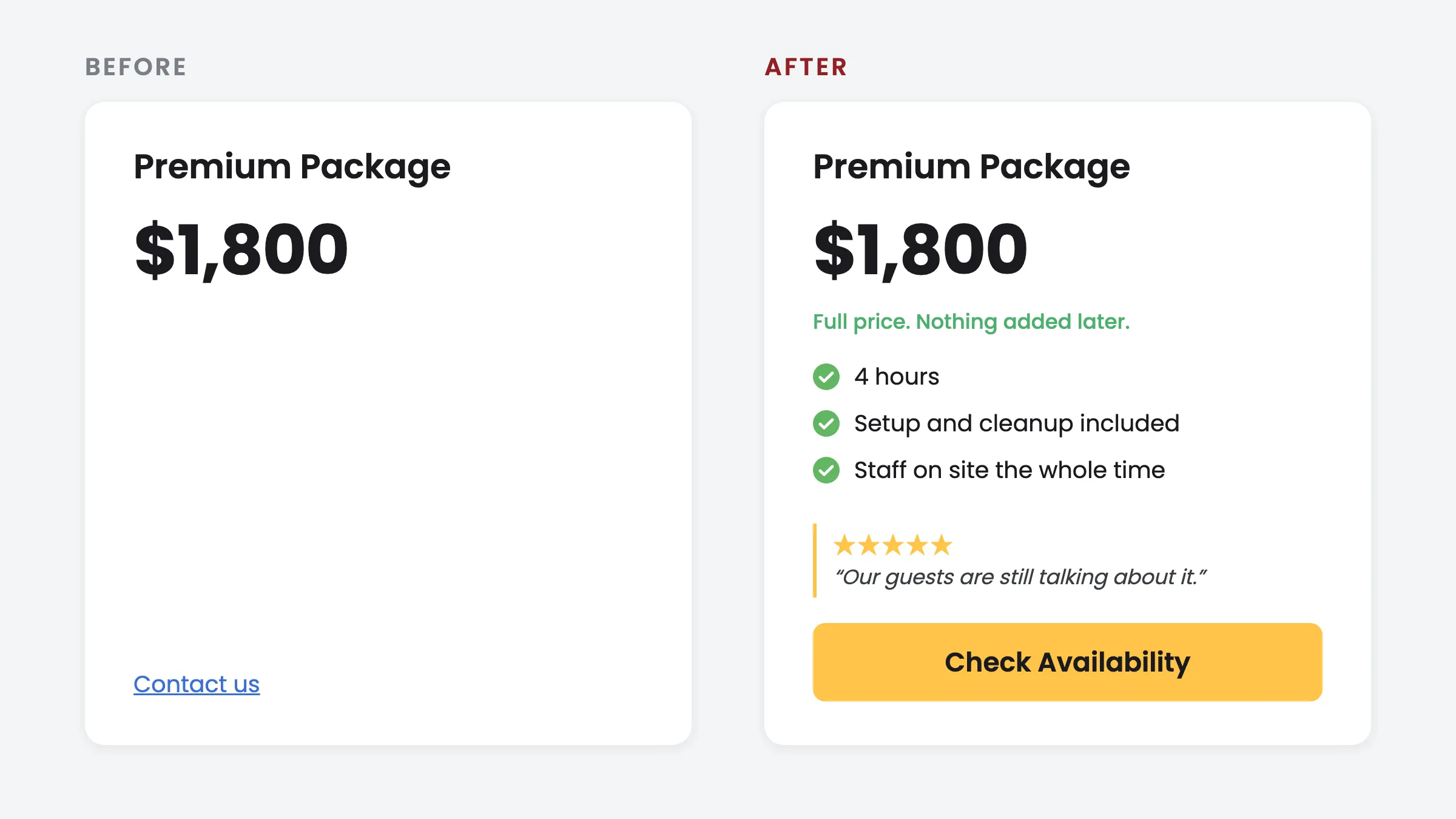
Then check for the dead end: a clear price, followed by a “Contact us” link or an email address and nothing else. The buyer has done their homework and the page has nowhere to send them.
The fix: replace the contact form under your prices with a Check Availability, Get a Quote, or Book Now button, and cut any remaining form to the fields you need to reply. If you use Check Cherry, the booking page already does this: clients see your packages, check their date against your live calendar, and book.
Where do your leads come from?
Not all leads are the same. Someone a past client sent your way already trusts you. Someone who found you online may be meeting you for the first time.
Word of mouth brings people who expect your price. A friend told them you’re great, and maybe what they paid. When they see your number, it matches what they heard.
People who found you online, through a search, a post, or an ad, may be comparing you with other options. The price is one of the first things they judge you on.
In Check Cherry booking data, a lead who found a business online was worth about 40% less than a word-of-mouth lead to that same business. Word-of-mouth leads booked about 43% of the time. Online leads booked about 23% of the time.
That’s why a drop after posting prices is bigger when most leads come from online. Some of those people were deciding on price anyway.
The fix: ask every new lead how they found you, and keep track. If most of your leads find you online, put more effort into word of mouth. Ask happy clients for referrals and reviews, and stay in touch with the vendors, venues, and planners you work with.
How is the number shown?
Sometimes the price is fine and the presentation is the problem. Two patterns to look for.
Only one number
The page shows a single price, or only the top package. With nothing to compare it to, the buyer has two options: yes or no. A middle option is what makes a choice feel reasonable, because it gives the buyer something to weigh it against.
The fix: show at least three packages, with the one most clients pick in the middle.
Your all-in price next to their “starting at”
Your number includes everything the client will pay for. A competitor’s says “starting at” and leaves the extras out. Side by side, you look more expensive, even when the final bill would be lower with you.
An honest all-in price loses to a vague “starting at” unless you show what’s in it.
The fix: list the inclusions right beside the number, and say plainly that it’s the full price. “Setup, staff, and travel included” or “Room, tables, and cleanup included” turns a higher number into the better deal.
What the checks tell you
If bookings held while inquiries dropped, the people who left weren’t going to book, and the hours you used to spend on those calls are yours again. If bookings fell too, one of the five checks may explain it. Either way, you’ll know what the price is doing, and whether to keep it up is your call.
Let clients book online, or ask for a quote
With Check Cherry, clients see your packages and prices, then book on the spot (sign and pay a deposit) or send you a quote request. You choose which, service by service. Either way, we handle the busywork that follows, from reminders to payments, so you spend far less time managing bookings.
Start free trial