A couple is choosing between three photo booth companies for their wedding. All three quoted about the same price. One has six Google reviews, one has 23, and one has 87 with a reply from the owner under most of them. Nobody calls the first company. That decision happens in your market every day, and you never see it. You just see fewer inquiries than you expected.
Google reviews are the highest-leverage free marketing asset a local event business has. They are also the asset most operators never build. Across the event businesses on the Check Cherry platform, only one in four (24%) automatically asks for a review after an event. Asking feels awkward, and the popular advice on "review funnels" teaches a tactic that can get your profile penalized. Here is the playbook that works and stays inside the lines, backed by twelve months of data on what gets clients to click.
Why reviews beat almost any ad you could buy
Reviews do two jobs. The first is getting you found. When someone searches "photo booth rental Austin" or "wedding DJ near me," Google shows a map with three businesses above everything else. Local search ranking studies, like Whitespark's Local Search Ranking Factors report, consistently find review count, rating, and recency among the strongest signals for who lands in that map pack. You cannot buy your way into that spot; reviews are a big part of how you earn it.
The second job is getting you picked. When a client compares three vendors with similar prices and photos, review count is the tiebreaker. And the winning profile is usually not the perfect one. Research from Northwestern's Spiegel Research Center found that purchase likelihood peaks when a rating sits around 4.0 to 4.7, then falls as it approaches a perfect 5.0. A 4.8 with eighty reviews tends to out-convert a flawless 5.0 with six, because a perfect score on a handful of reviews reads like friends and family.
You have an advantage most local businesses would kill for
Think about when a plumber asks for a review: the client just paid an invoice they resented for a problem they never wanted. Your job ends differently. The party was a hit, guests are still texting photos, and your client is at an emotional high point you helped create. You get a moment like that at the end of every job.
If you are not asking in that window, you are leaving your best marketing asset on the table. And we can put numbers on how big that table is.
What 33,000 review requests taught us
Most operators skip the ask because it feels pushy. To see what actually happens, we looked at twelve months of email engagement across the platform: 27,805 automated post-event review-request emails, 5,865 hand-written review requests, and a 30,000-message baseline sample of other post-event automated emails. Two findings stand out.
First, the adoption gap is enormous. Beyond the one in four with an automated ask, fewer than half of businesses (46.9%) have even an informal "leave us a review" line anywhere in their post-event messages. The majority never systematically ask. Every tactic below is an edge most of your competitors have not built.
Second, clients are not annoyed by the ask. The opposite. Automated review requests were opened by nearly three in four recipients (72%, versus 63.5% for other post-event automated messages) and clicked nearly twice as often (17% versus 9%). The bottleneck is not clients ignoring the ask. It is sending it.
The short version, with the numbers in one place:
- Data: 33,670 review requests sent by event businesses on the Check Cherry platform, June 2025 to June 2026.
- Only 24% of businesses automate a review ask after events.
- Review request emails were clicked 17%, versus 9% for other post-event email.
- Asks sent within 24 hours were clicked 23%, versus roughly 12% after a week.
- Hand-written asks were clicked 56%.
What is review gating, and is it allowed?
Before the playbook, the warning. A tactic sold all over YouTube and baked into a lot of "reputation management" software works like this: after the event, you ask "How would you rate your experience?" Happy clients get forwarded to your Google review link. Unhappy clients get routed to a private feedback form you handle quietly.
It is called review gating, and it is a trap for two reasons. First, Google's review policies explicitly prohibit it. Google can remove your reviews or penalize your profile, which means months of honest five-star reviews can disappear because of the funnel that collected them. Second, since late 2024 the FTC has a rule on consumer reviews and testimonials that prohibits suppressing or preventing negative reviews. In the US, gating is not just a terms-of-service problem. It is legal exposure, with civil penalties on the table. (We are not your lawyers. The short version: do not pre-screen.)
The compliant alternative is not complicated: ask everyone. Every client gets the same review link, regardless of how the event went. If you want private feedback too, ask for it in addition to the Google link, never instead of it. You will occasionally get a review you wish you had not. That is fine; we cover that below.
The playbook: how to actually ask
Get your review link and make it a 30-second job
In your Google Business Profile, look for "Ask for reviews." Google gives you a short link that drops the client directly onto the review form, signed in, ready to type. If leaving a review takes more than 30 seconds, most people will not finish. Never make a client hunt for the button themselves.
When should you ask for a Google review?
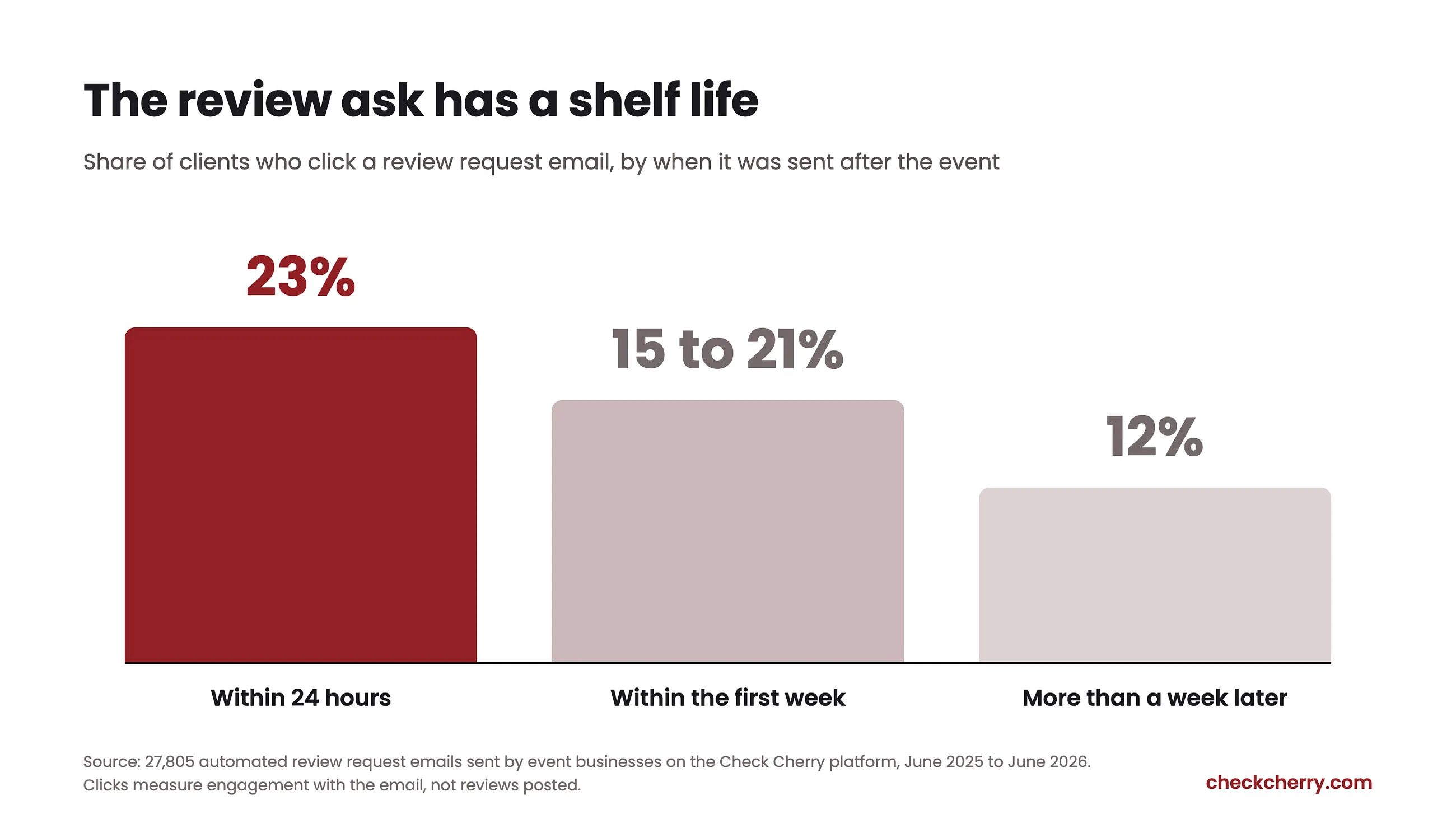
In our data, the first 24 hours is the sweet spot. Review asks sent within a day of the event were clicked 23% of the time, the best of any window we measured. Anything within the first week still landed in a 15% to 21% range; after a week, clicks fell to roughly 12%. The glow fades. Ask while guests are still texting about the party, not two normal Tuesdays later.
If you deliver photos or a gallery, that delivery is a second natural high point. Attach the ask right to it: "Your gallery is ready. If you have 30 seconds, a Google review helps us a ton."
What about texting? SMS carries no click telemetry, so our data cannot measure it, but the same rules apply: the same link for everyone, sent while the event is fresh, one personal line. For younger clients a text is often the better channel. Just do not gate.
Make it personal, not a blast
"Please leave us a review" from a no-reply address gets ignored. A note that names the event gets acted on: "It was so fun being part of Sarah's 40th. That conga line will stay with me. If you have 30 seconds, a Google review helps our small business a ton." One specific detail is the difference between a request and a form letter, and it tends to show up in the review itself, where it convinces the next reader.
This is the strongest pattern in our data. Hand-written review requests were opened 84% of the time, and more than half of recipients clicked (56%). Fully templated automated asks were clicked 17% of the time. An honest caveat: hand-written messages partly reflect existing rapport, and some are surely "sure, send me the link" replies. It is a strong signal that personal wording matters, not a promise of triple the clicks.
A review request worth stealing
Subject: Thank you from [Business Name]
Hi [First Name],
[One personal line about their event. This is the sentence that does the work: "Watching your dad's toast from behind the booth was the highlight of our weekend." Write it fresh every time.]
If you have 30 seconds, a Google review would mean a lot to us. Most of our bookings come from people reading them:
[Your Google review link]
Thank you for letting us be part of it.
[Your name]
That bracketed personal line is where the 56% click rate lives. In Check Cherry, the rest fills itself in with dynamic fields, and the Review Messages queue is where you write that one line before the message goes out.
Automate the consistency, personalize the message
The reason most event businesses have six reviews instead of sixty is not that clients refuse. The click rates above show they are happy to. It is that the ask depends on the owner remembering, and the morning after a triple-booked Saturday, nobody remembers. Nobody hand-writes at scale either: our sample had about five times more automated asks than personal ones.
The winning move is the synthesis. Automate the trigger so the ask goes out every time, then personalize the message so it does not read like a machine. In Check Cherry, an automated post-event message can send your review ask on schedule after every event, with dynamic fields filling in the client's name and event details. For closer to the hand-written effect, the Review Messages setting holds each message in a queue so you can add one personal line before it goes out. The same idea works in any system. The point is that the ask happens every time, and sounds like you every time.
Catch people on site
Some of your happiest reviewers are guests, not just the client who hired you. A QR code on the print station, a small sign at the booth, or a card on the bar puts the link in front of people at the exact moment they are having a great time. A quick mention at teardown works too: "If you had fun tonight, a Google review means the world to us."
What not to do
- Don't pay for reviews, with money, discounts, or free add-ons. Incentivized reviews land in the same FTC territory as gating, and Google looks for them.
- Don't review-swap with other vendors. "I'll five-star you if you five-star me" produces reviews from accounts that never hired you, and Google detects the pattern.
- Don't have family and friends pad the count. Reviews clustered around your own account are exactly what fraud detection is built to catch, and one removal sweep can take legitimate reviews down with them.
Should you reply to every Google review?
A profile where the owner replies reads as a business that is paying attention. Keep it short and name a detail: "Thank you, Maria. Your dad's toast had our whole crew tearing up too." The reply is really for the next prospect scrolling through. One caution: do not hand replies entirely to AI. A templated-sounding response under a heartfelt five-star review reads worse than no reply at all.
When the bad review comes
Get enough reviews and eventually one stings. Before you type a word, remember who the reply is actually for. It is not the person who wrote the review. They have already had their experience, and you are unlikely to change their mind in a comment thread. The reply is for every future client who finds your profile, scrolls to the worst review first (everyone does), and watches how you handled it.
That audience changes how you write. You do not need to win the argument. You need to sound calm, fair, and professional to a stranger who was not there. Respond once, acknowledge the experience, state your side briefly if the facts matter, and move it offline: "I am sorry the timeline felt rushed. I would like to make this right. Please reach out directly." Then fix what is fixable. Never argue point by point, never threaten, never beg for removal. A measured reply under a harsh review can do more for your next booking than the five-star review sitting above it.
Your checklist for this week
- Grab your review link from your Google Business Profile and save it somewhere you can paste from in five seconds.
- Set up an automated post-event message that sends the ask with your link within a day of every event.
- Add a QR code to your booth, booth sign, print station, or bar setup.
- Reply to your last ten reviews, including the old ones.
- If anything in your current process pre-screens clients before showing the Google link, turn it off today.
Remember the couple at the top, choosing between three companies. Three out of four of your competitors are not systematically asking. Six months of asking everyone, every time, is the difference between being the profile with six reviews and being the one they call.
Set up your review ask this week
Check Cherry can send your review ask automatically after every event and hold each message so you can add a personal line first. No credit card required.
Start Free Trial