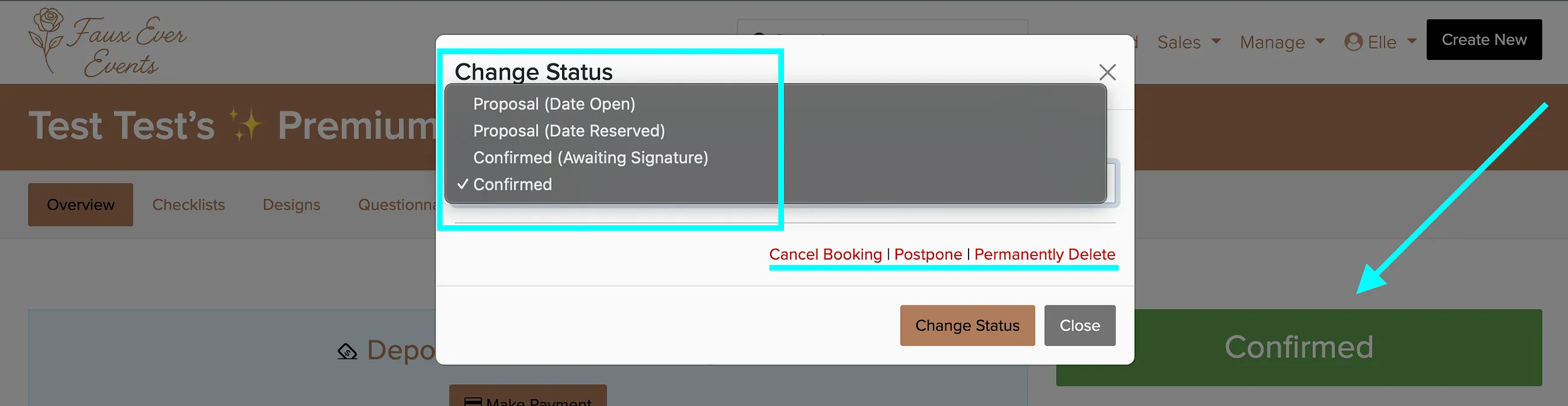
Every proposal and booking in Check Cherry has a status that shows where things stand, from first quote to signed contract. Each status answers two questions: is the date held so no one else can take it, and does Check Cherry treat this as a booking or as a quote that has not closed yet.
| Status | Holds the date | Counts as a booking |
|---|---|---|
| Proposal (Date Open) | No | No |
| Proposal (Date Reserved) | Yes, until the proposal expires | No |
| Proposal (Awaiting Review) | No | No |
| Confirmed (Awaiting Signature) | Yes | Yes |
| Confirmed | Yes | Yes |
Proposal Statuses
Proposals are quotes you send to potential clients. Proposals run your proposal automations, such as follow ups and expiration reminders, and they do not run your booking automations. Proposals also have no Booked At date, so they stay out of your booked revenue reporting until they close.
Proposal (Date Open)
A quote sent without holding the date. Your availability stays open, so another client can book that date and time, and the packages, add ons, staff, and backdrops on the proposal stay available to everyone else.
Use this when the client is still shopping, when you are quoting more than one client for the same date, or when you do not want a maybe to block real bookings. It is the safer default for most quotes, because nothing sits idle while you wait for an answer.
Proposal (Date Reserved)
A quote with the date held. Check Cherry treats the equipment, staff, and time as taken, so the date stops showing as available online and you get a conflict warning if you try to double book it. The hold releases automatically once the proposal passes its Valid Through date, and the proposal then shows as an Expired Proposal.
Use this when a client has verbally committed and you are only waiting on the contract, when you are giving a short courtesy hold, or when you only run one event per day and would rather not risk a double booking. Keep the Valid Through date short so a hold cannot sit on a busy date for weeks.
Proposal (Awaiting Review)
Created when a package is set to Request for Proposal. When someone books that kind of package online, Check Cherry creates the proposal for you to review and approve before the client sees it. The date is not held while it waits for you, so review these quickly if the date matters.
Use Request for Proposal packages when pricing depends on details you need to see first, such as travel, guest count, or custom work, and you do not want an automatic price going out.
Booking Statuses
Once a client moves forward, the proposal becomes a booking. Both booking statuses hold the date, stamp a Booked At date, appear in your booking reports and revenue projections, sync to your linked calendars, and switch the record from your proposal automations over to your booking automations.
Confirmed (Awaiting Signature)
The event is booked but the contract is not signed yet. You set this manually to lock the date while the paperwork catches up, and Check Cherry keeps reminding the client to sign. The client signs from their account, so this is the right status when the sale happened somewhere other than a proposal link.
Use it when you took the booking by phone or in person, when you collected a deposit before the contract went out, or when you are importing bookings you already sold. It also applies when you change the contract on a booking that was already signed and the client needs to sign the new version. Do not use it as a maybe pile. It reserves your date and counts as booked in your reports, so anything still uncertain belongs in a proposal status.
Confirmed
The client has signed the contract and typically paid the deposit. Check Cherry sets this automatically when they finish signing, and you can also set it manually when you create a booking yourself.
Postponed
Postponed is not a status on its own. It is a flag you turn on over the current status, so you will see labels like Postponed Booking, Postponed Proposal, or Postponed Request for Proposal.
While a booking or proposal is postponed:
- Automated messages stop, so the client does not get reminders for a date that is no longer happening.
- It is removed from your linked calendars.
- The date is released, so you or another client can book that slot.
- It is hidden from your booking list and reports by default, and you can filter it back in when you want to see it.
Everything else stays intact. The packages, pricing, payments already collected, questionnaires, and history all stay on the record, which is why postponing beats canceling and rebuilding the booking later.
Use Postponed when the event is still happening but the date has moved and you do not know the new date yet. Use Canceled when the event is not happening at all. Once the client gives you a new date, update the date on the booking, then turn Postponed off so the status goes back to Confirmed and your automated messages run on the new timeline.
Changing a status