Spending money on Google Ads and want to know which ads actually result in bookings? Conversion tracking connects the dots between ad clicks and completed bookings, so you can see which campaigns are worth your budget.
You don't need to paste any tags or code into your own website. You paste the Event snippet from your Google Ads conversion, and Check Cherry reads the IDs out of it for you — there's no "Conversion Label" to hunt down. Check Cherry fires the conversion automatically, and only when a booking is actually completed — never on every page view.
Getting your Event snippet from Google Ads
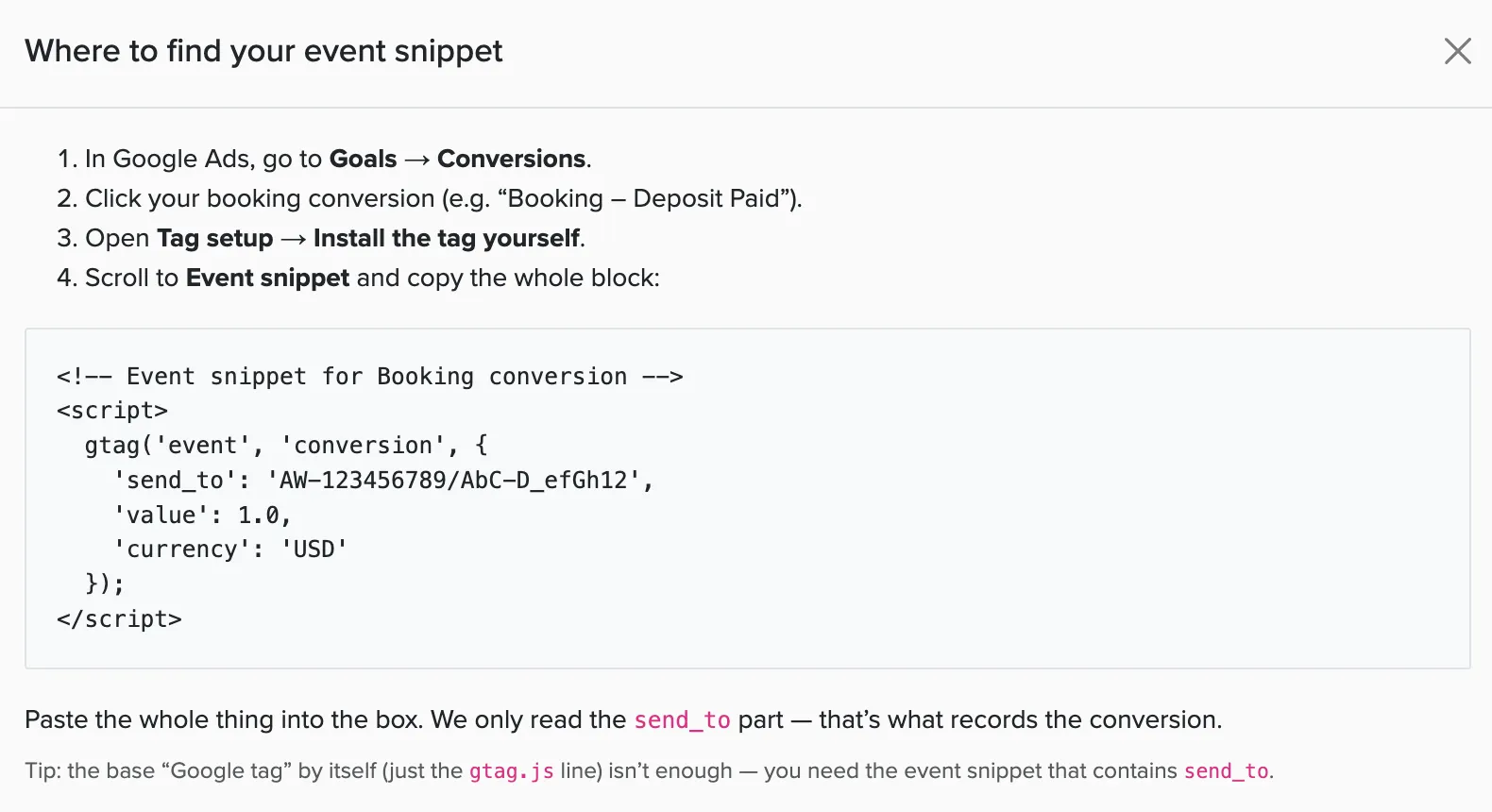
In Google Ads, go to Goals → Conversions, click your booking conversion, then open Tag setup and choose "Install the tag yourself." Scroll down to the Event snippet and copy the whole block.
The Event snippet contains a line like gtag('event', 'conversion', { 'send_to': 'AW-123456789/AbC-D_efGh12' }). Check Cherry only reads the send_to value — that's the part that records the conversion. You don't have to touch anything else in the snippet.
The base Google tag on its own (just the gtag.js line) isn't enough — it has no send_to, so there's nothing for Check Cherry to fire against. Be sure to copy the Event snippet, the block that contains send_to. A Google Analytics "G-" tag won't work here either; the value needs to start with AW-.
If you haven't set up a conversion action yet, create one first. Choose "Website" as the source and "Purchase" or "Lead" as the category, then come back for the Event snippet.
Setting up tracking in Check Cherry
Manage → Business Settings → Integrations
Go to Integrations.
Find Google Ads and click Enable.
Paste your Event snippet into the Booking conversion snippet field. Check Cherry reads the IDs automatically.
If you track leads as a separate conversion in Google Ads, paste that Event snippet into the optional Lead conversion snippet field. Otherwise leave it blank.
Click Save.
Check Cherry fires a conversion when a client completes a booking — they sign the contract and pay the deposit. It won't fire just because someone visited your site or started filling things out.
Check Cherry actually tracks two things: a lead event when someone starts your online booking (fills out the first step), and a conversion event when they complete the booking. The lead conversion snippet field above is what powers that first event — most businesses set up only the booking conversion and leave leads off, which is perfectly fine.
Also using Google Tag Manager or Google Analytics? Even if you leave the Lead conversion snippet blank, Check Cherry still pushes a check_cherry_new_lead event to the GTM data layer (and a GA4 generate_lead event) every time someone starts your online booking. So you can still track booking-starts in Google Tag Manager or Google Analytics without setting up a separate Google Ads lead conversion — the Lead conversion snippet only controls whether that start also registers as a conversion in your Google Ads account.
Check Cherry automatically includes the booking's total value and currency with every conversion. That means you can report return on ad spend (ROAS) and use value-based bidding in Google Ads without any extra setup.
What gets sent to Google: When a booking completes, Check Cherry sends the booking's total value, currency, package name, and a unique booking ID — so you can measure ROAS and see which packages your ads drive. Because this sends booking data to your own Google Ads account, make sure your business's privacy policy discloses that you use advertising conversion tracking.
Not seeing conversions?
Give it time — conversions can take 24–48 hours to show up in your Google Ads reports.
Make sure the conversion action is still active in Google Ads, not paused or removed.
Confirm you pasted the Event snippet (the part containing send_to) — not just the base Google tag or a GA4 "G-" ID. If you paste the wrong thing, the field tells you when you save.
Confirm a booking was actually completed. Conversions only fire when a client signs the contract and pays the deposit — not on open proposals or test bookings you cancel.
Checking your booking site's source code for the tag? While you're signed in to Check Cherry as an owner, admin, or staff member, your tracking tags are hidden on purpose — that keeps your own visits from firing conversions or skewing your data. Open your booking site in a private or incognito window, signed out, to see what real visitors get.
Running Google Ads to your own website? For conversion tracking to work automatically, point your ads straight at your Check Cherry booking site — then the click and the booking happen on the same site, and Check Cherry fires the conversion for you. If you send ad traffic to a page on your own website instead (for example, one with an embedded Check Cherry form), your booking site is a separate domain, so those conversions won't tie back to the ad unless you set up cross-domain measurement (the same setup described for Google Analytics).
Want to count embedded lead-form submissions as conversions? An embedded Check Cherry lead form creates a lead — it doesn't fire a Google Ads conversion on its own. To count each submission, open your contact form's settings, set the submit action to "Save and Redirect to URL," and point it at a thank-you page on your own website. Then install your Google Ads conversion snippet on that thank-you page. Because the visitor lands back on your own site — where the ad click was recorded — the conversion attributes correctly.
Was this article helpful?
Thanks for your feedback!
Sorry to hear that. Want to chat with our support team?