After a client books, questionnaires help you collect the event details you need to deliver great service. Use them for timelines, song requests, vendor contacts, dietary needs, or anything that helps you prepare.
You build each questionnaire once as a template and tie it to the packages it applies to. From then on, every new booking that includes a matching package automatically gets its own copy, so the right questions are waiting on the booking. You can also add a questionnaire to a booking by hand with the New Questionnaire button on its Questionnaires tab. For who can see and edit each questionnaire, and how to push template changes to bookings you have already taken, see How do I configure questionnaire settings?
Start from a template or build your own
Check Cherry includes pre-built questionnaire templates for common event types, including weddings, DJ services, photo booths, mobile bartending, and photography. Use one as a starting point and adjust it, build your own from scratch, or duplicate an existing questionnaire to reuse its structure.
Creating a questionnaire
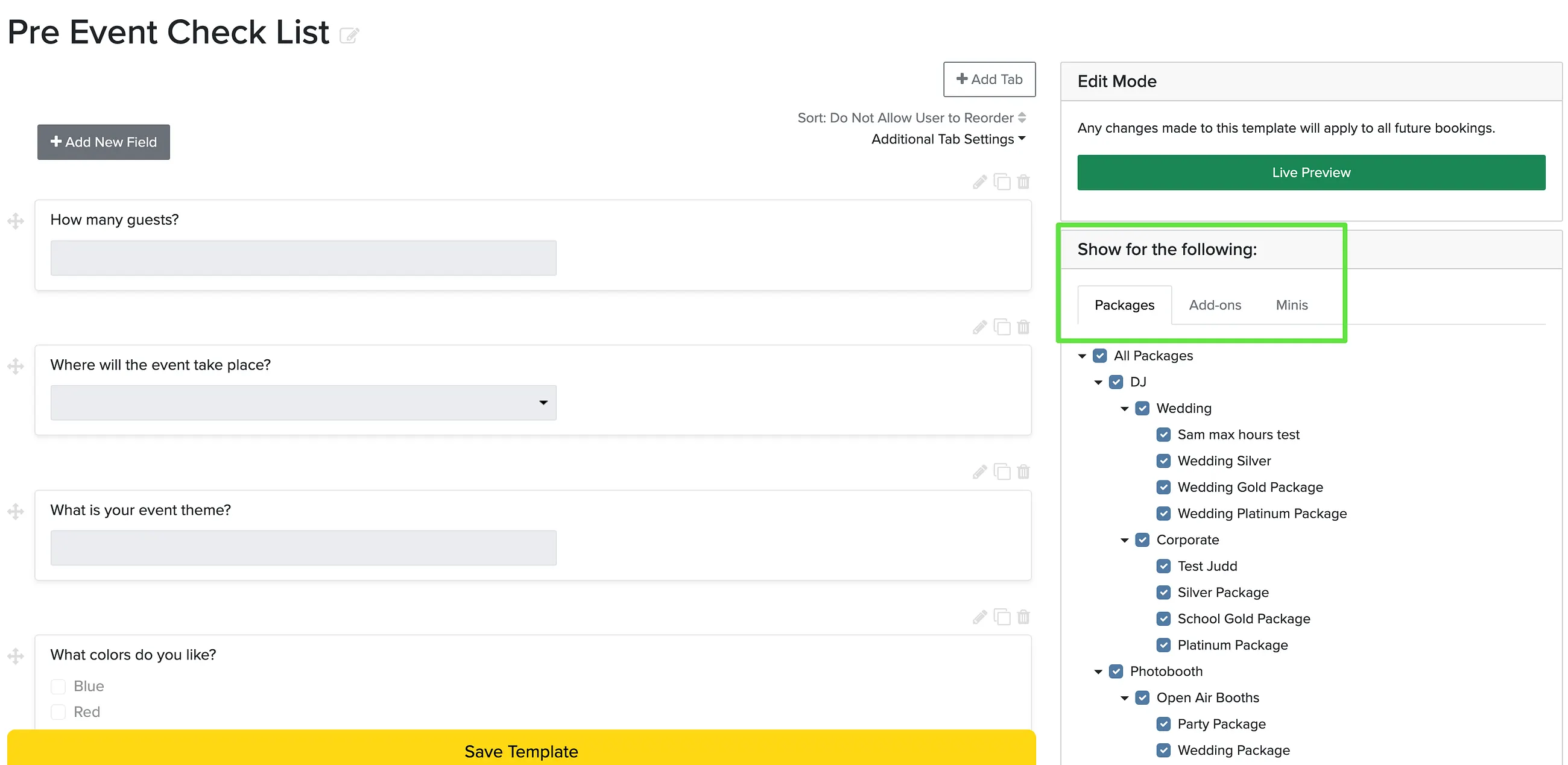
In the right sidebar, you can assign the questionnaire to specific packages, add-ons, or sessions. This is what decides which bookings receive it.
Organizing with tabs
Tabs break a longer questionnaire into sections, such as Ceremony, Reception, and Music. Use Add Tab to create one, then rename it or use its settings to move it left or right, duplicate it, or remove it. You can also allow clients to drag and drop the fields within a tab to reorder them. For more on tab order, see Can I change the order of tabs in a questionnaire?
Field Types
You can format your questionnaires with different field types to collect exactly what you need:
Formatting Options
- Header
- Subheader
- Separator
- Plain Text
- Rich Text
- Static Image
Fillable Field Types
- Text Field (single, double, triple, or quadruple line)
- Text Box (larger text area)
- Dropdown
- Radio Buttons
- Checkbox
- Checkbox Group
- Date Field
- Time Field
- Color Picker
- File Upload
- Image Upload
- E-Signature
Music Fields
- Song
- Song List
- Spotify Playlist
- Apple Music Playlist
- YouTube Music Playlist
- Streaming Service Playlist
Field options
Each fillable field has options you can set when you add or edit it:
- Required: require an answer before the questionnaire can be submitted.
- Hint text: add help text under a field to guide the answer.
- Placeholder: show example text inside the field.
- Repeatable: let clients add multiple entries, with a starting and maximum number.
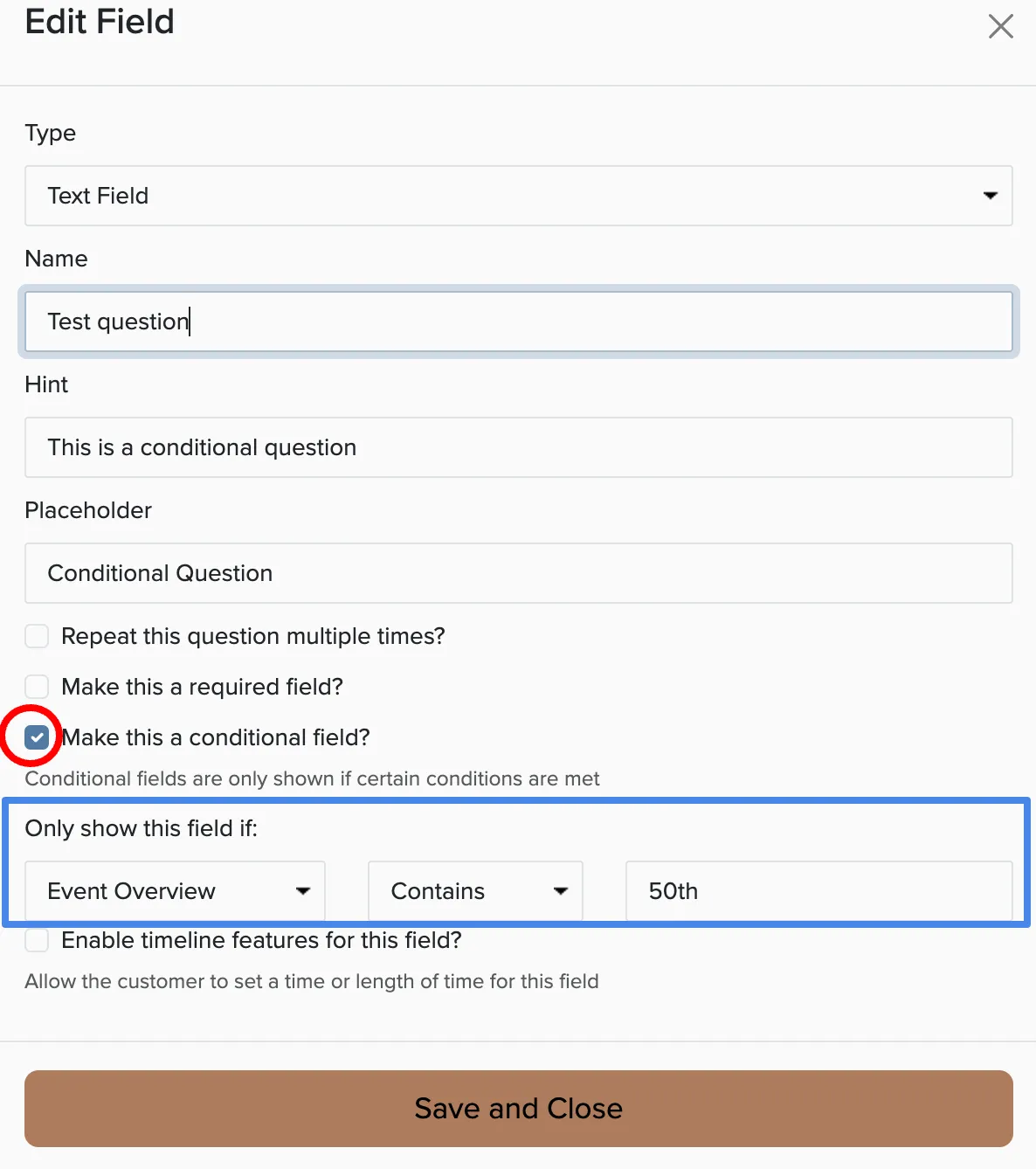
- Conditional: only show the field when certain conditions are met.
- Timeline: let clients set a length of time, a start time, or a start and end time, which is useful for building an event timeline.
- Suggestions: for song and text fields, offer a suggestion list and optionally allow custom entries.
Conditional Fields
Conditional fields are only shown if certain conditions are met. For example, show cocktail preferences only when someone books a bartending package, or ask about dietary restrictions only when catering is included.
When questionnaires appear
Each questionnaire can be set to show before or after the booking. Use before for pre-event questionnaires clients fill out ahead of time, and after for post-event surveys. You can change this in the questionnaire's settings.
How clients fill out a questionnaire
Clients see their questionnaires when they log in to their booking, under the Questionnaires tab. They click Fill Out, and their answers save automatically as they go. When they are finished, they click Submit Final Version to finalize it.
Reviewing and managing responses
Open a booking and go to the Questionnaires tab to see every questionnaire and its answers. From the menu next to each one you can:
- Fill Out or Show: complete a questionnaire on a client's behalf, or view a read-only copy.
- Revise Questions: change the questions on just this booking.
- Previous Versions: see the history of changes and restore an earlier version.
- Reset: erase the answers and reload the latest template.
- Unlock: reopen a submitted questionnaire so it can be edited again.
- Print-Friendly Version or Download PDF: save a copy of the questions and answers.
- Download CSV: export the answers, including full song and playlist details, as a spreadsheet.
Get notified when a questionnaire is completed
You can send a message automatically whenever a client marks a questionnaire complete. Set up the Questionnaire Marked Complete automated message to notify your team, or to send the client a confirmation. You will find it under Manage → Automated Messages.